
Agent Design Patterns Used in Enterprise AI Systems
What I've learned building LLM agents that actually run in production
There's a gap between the demo-tier agent tutorials you'll find online and what it actually takes to ship an LLM agent inside a large organization. The demos show you a loop. The enterprise asks: what happens when the LLM is slow? What happens when your tool returns garbage? What happens when the user asks a follow-up question and the agent has forgotten everything?
Over the past year I've been building agentic AI systems in a regulated financial services environment. The patterns below aren't academic — each one solved a real failure mode I ran into. I've stripped out all the proprietary details, but the engineering is real.
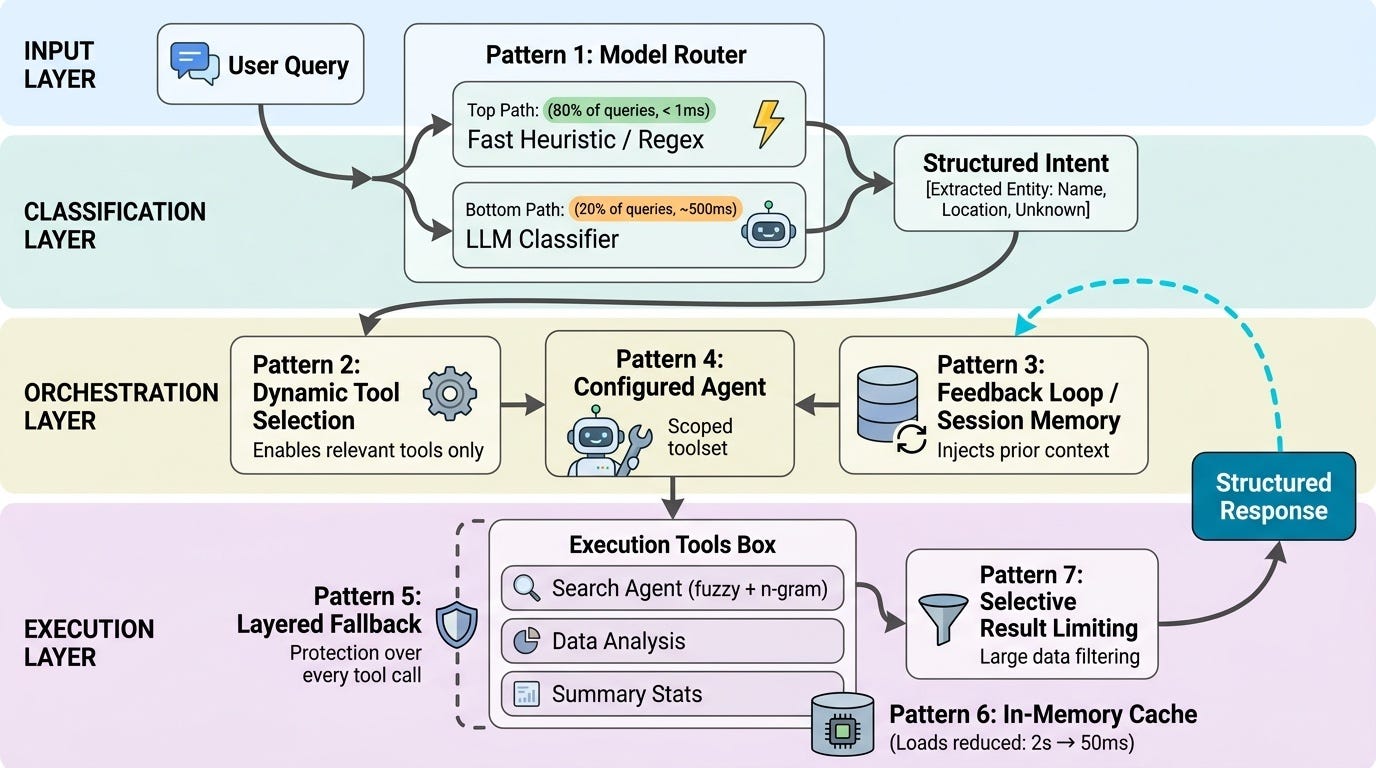
The Enterprise Constraint Set
Before diving into patterns, it helps to understand what's different in enterprise:
Latency budgets are tight. Users in ops or analytics workflows won't wait 8 seconds for a response.
Cost per query matters at scale. An extra LLM call per message × 10,000 queries/month adds up fast.
Auditability is non-negotiable. In regulated industries, you need to be able to explain why the agent used a particular tool or returned a particular answer.
Data lives behind access controls. You can't just "give the agent everything" — tool access has to be scoped to what the user is allowed to see.
These constraints shape every pattern below.
Pattern 1: Hybrid Intent Classification (Model Router)
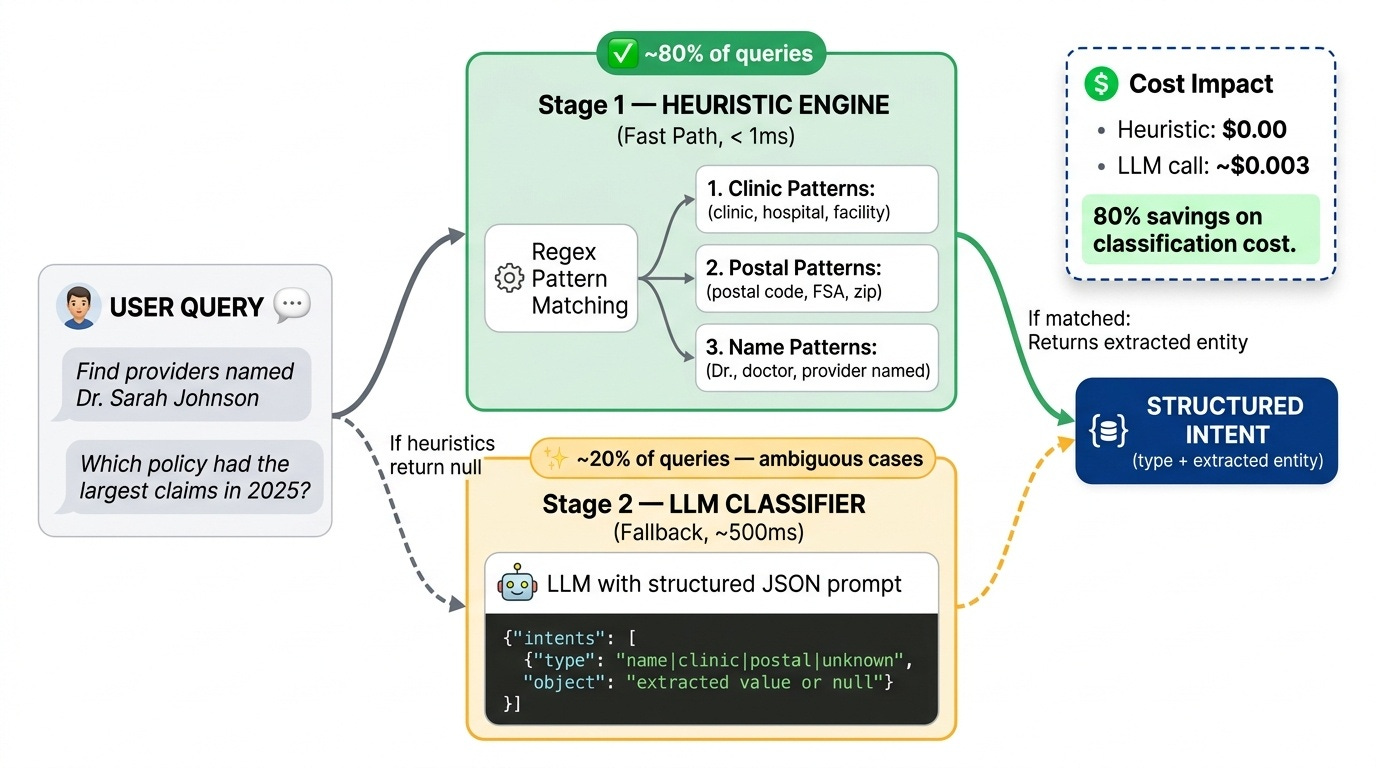
Problem: You need to know what the user is asking before you can pick the right tools. But calling an LLM for every classification is expensive and slow.
Solution: Two-stage classification — regex heuristics first, LLM fallback only when heuristics fail.
def classify_intent(query: str) -> dict:
    # Stage 1: fast heuristics (< 1ms)
    result = _classify_by_heuristics(query)
    if result is not None:
        return result

    # Stage 2: LLM fallback (~400–600ms)
    return _classify_by_llm(query, llm)

def _classify_by_heuristics(query: str) -> Optional[str]:
    query_lower = query.lower()
    if CLINIC_PATTERNS.search(query_lower):
        return {"intent": "clinic", "entity": _extract_clinic_name(query)}
    if POSTAL_PATTERNS.search(query_lower):
        return {"intent": "postal", "entity": _extract_postal_code(query)}
    if DOCTOR_MENTION.search(query):
        return {"intent": "name", "entity": _extract_person_name(query)}
    return None  # signal: fall through to LLM
In practice: ~80% of queries are handled by heuristics. The LLM only fires for ambiguous cases. This keeps median latency under 100ms while preserving accuracy for edge cases.
The LLM classifier returns structured JSON:
prompt = """You are an intent classifier. Return ONLY valid JSON:
{"intents": [{"type": "<name|clinic|postal|unknown>", "object": "<value_or_null>"}]}

Query: {query}"""
Forcing JSON output makes the downstream routing deterministic. No parsing surprises.
Pattern 2: Dynamic Tool Selection
Problem: Giving the agent access to every tool at all times is wasteful and confusing. An agent with 8 tools available will sometimes use the wrong one.
Solution: Only enable tools that are relevant to the detected intent.
# Base set: always enabled
enabled_tools = [tools["analyze_data"]]

# Entity-specific tools: only when we have a named entity
has_entity = any(
    i["type"] in ["name", "clinic", "postal"]
    for i in classified_intents
)

if has_entity:
    enabled_tools.extend([
        tools["search_registry"],
        tools["get_records"],
        tools["aggregate_monthly"],
        tools["analyze_activity"],
        tools["get_summary_stats"],
    ])

agent = Agent(instructions=SYSTEM_PROMPT, tools=enabled_tools, model=model)
Why it matters: Fewer tools = smaller decision space = faster tool selection + fewer wrong-tool errors. It also gives you implicit routing — the agent physically cannot call a tool you haven't enabled.
Pattern 3: Multi-Algorithm Entity Search (Search Agent)
Problem: Users don't spell consistently. "Dr. Johnson" vs "Johnson, Sarah" vs "Dr. Sara Jonhson" are all the same person.
Solution: Three-layer matching — exact, fuzzy (Levenshtein), n-gram (Jaccard). Apply all three; keep results that pass any one threshold.
def _fuzz_score(x: str, y: str) -> float:
    """Levenshtein-based partial ratio."""
    return 1.0 if x == y else fuzz.partial_ratio(x, y) / 100.0

def _ngram_sim(x: str, y: str) -> float:
    """Jaccard similarity on token sets."""
    set_x, set_y = set(x.split()), set(y.split())
    inter = set_x & set_y
    union = set_x | set_y
    return len(inter) / len(union) if union else 0.0

# Apply both scores, pass if either exceeds threshold
df["fuzz"] = df["NAME"].apply(lambda n: _fuzz_score(n.upper(), query_upper))
df["ngram"] = df["NAME"].apply(lambda n: _ngram_sim(n.upper(), query_upper))

matches = df[
    (df["NAME"].str.upper() == query_upper) |   # exact
    (df["fuzz"] >= 0.6) |                        # fuzzy
    (df["ngram"] >= 0.5)                         # n-gram
]
Why both fuzzy and n-gram?
Fuzzy catches typos: "Jonhson" → "Johnson"
N-gram catches reorderings: "Sarah Johnson" → "Johnson Sarah"
Combined: you get recall without sacrificing precision
Pattern 4: Layered Fallback
Problem: Production systems fail. The LLM times out. The database is slow. The SDK isn't installed in some environment.
Solution: Multiple independent fallback layers, each one degrading gracefully to the next.
# Layer 1: SDK availability
try:
    from agents import Agent, Runner, function_tool
    SDK_AVAILABLE = True
except ImportError:
    SDK_AVAILABLE = False

if not SDK_AVAILABLE:
    return "Agent SDK not available. Please install openai-agents."

# Layer 2: Classification fallback (heuristic → LLM → default)
intent = _classify_by_heuristics(query)
if intent is None:
    try:
        intent = _classify_by_llm(query, llm)
    except RateLimitError:
        intent = _classify_by_llm(query, llm)  # single retry
    except Exception:
        intent = {"type": "unknown", "object": None}  # safe default

# Layer 3: Tool execution fallback
try:
    result = run_tool(params)
except Exception as e:
    return json.dumps({"error": str(e), "success": False})
Key principle: Every layer has exactly one job. The SDK check doesn't know about rate limits. The rate limit handler doesn't know about tool failures. Each layer handles exactly one class of failure and passes everything else down.
Pattern 5: Session Memory and Context Reuse (Feedback Loop)
Problem: Users ask follow-up questions. "What about that second provider?" doesn't make sense without memory of the previous turn.
Solution: SQLite-backed session memory + explicit context reuse for ambiguous follow-ups.
# On session start
session_id = user_session.get("id")
memory = SQLiteSession(session_id=session_id, db_path=":memory:")
user_session.set("agent_memory", memory)

# On each message
result = await Runner.run(
    agent,
    input=query,
    session=memory  # agent sees full conversation history
)

# Context reuse for unknown intents (follow-up questions)
if any(i["type"] == "unknown" for i in intents):
    previous_tools = user_session.get("previous_enabled_tools")
    if previous_tools:
        # "What about that other provider?" → reuse last search context
        enabled_tools = previous_tools
The context reuse heuristic is simple: if the intent is "unknown" (no entities detected), the user is probably asking about something already established in the conversation. Reuse the tool set from the previous turn instead of starting fresh.
Pattern 6: In-Memory Data Caching
Problem: Loading a large DataFrame from a data lake on every query adds 2+ seconds of latency.
Solution: Lazy-load into a module-level cache. First call pays the load cost; every subsequent call uses the in-memory copy.
_registry_df: Optional[pd.DataFrame] = None
_records_df: Optional[pd.DataFrame] = None

def _load_registry() -> pd.DataFrame:
    global _registry_df
    if _registry_df is None:
        dt = DeltaTable(REGISTRY_PATH)
        _registry_df = dt.to_pandas()
    return _registry_df
Result: First query: ~2s. Subsequent queries: ~50ms. 40× improvement for a few lines of code.
Watch out for: Memory pressure if DataFrames are very large, and stale data if the underlying source updates. For most analytics use cases, session-lifetime caching is a reasonable trade-off.
Pattern 7: Selective Result Limiting
Problem: Returning 50,000 rows to the LLM context window is expensive, slow, and usually useless.
Solution: Return summaries and limited result sets by default. Only go wide when the user explicitly asks.
@function_tool
def get_records(entity_ids: list[str]) -> str:
    """Get records for the given entity IDs."""
    result = fetch_records(entity_ids, limit=100)  # never return everything
    return json.dumps(result, default=str)

@function_tool
def get_summary_stats(entity_ids: list[str]) -> str:
    """Get summary statistics: first/last date, total amounts, counts."""
    # Returns 5 numbers instead of 5000 rows
    result = compute_summaries(entity_ids)
    return json.dumps(result, default=str)
Design your tool set so the agent reaches for summaries first and raw records only when it genuinely needs them. This is a prompt engineering + tool design problem together — your tool descriptions need to clearly signal when to use which.
By the Numbers
Two patterns that pay for themselves immediately — the classification split and the caching improvement:
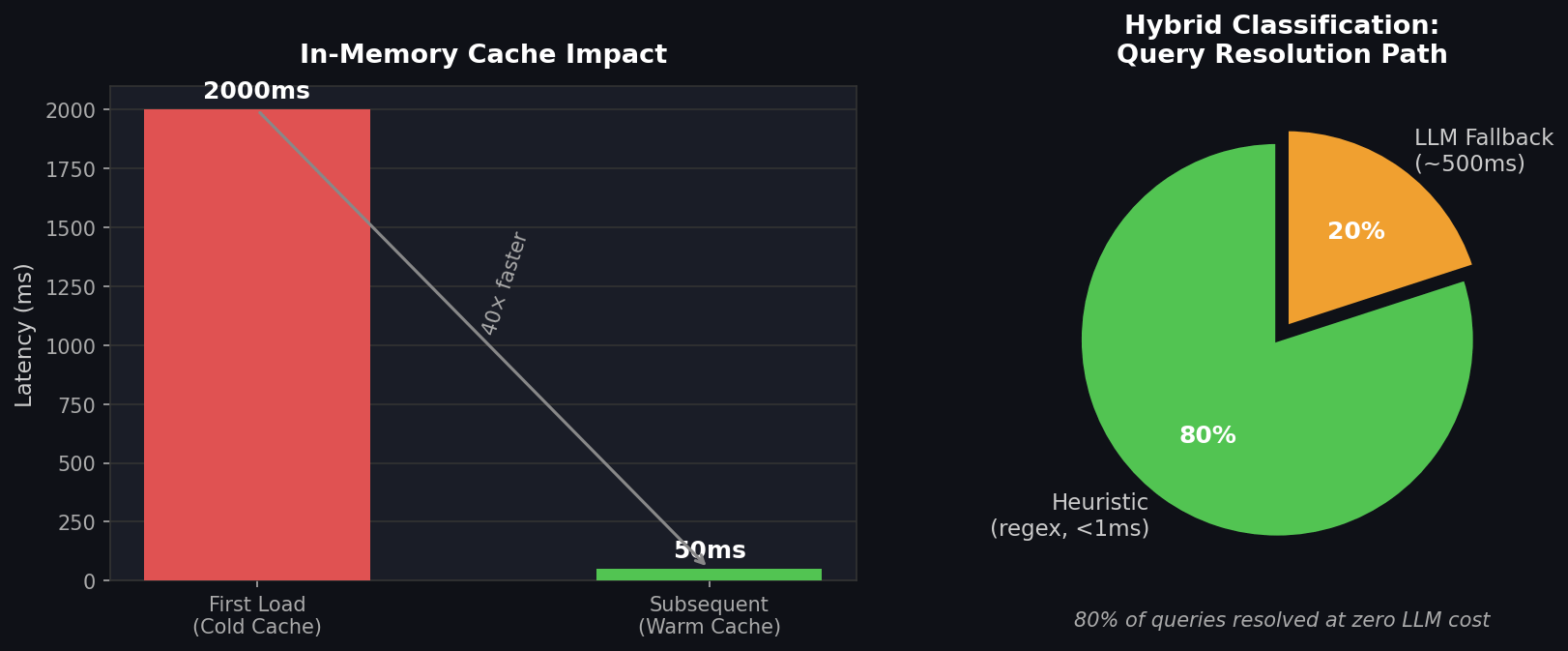
The caching win is almost embarrassingly simple. The classification split is worth thinking about carefully upfront — the 80% heuristic coverage number will vary by domain, but even 50% coverage halves your classification cost.
How These Patterns Combine
These patterns aren't independent — they're designed to compose:
Pattern 1 (Model Router)
    → classifies intent
    → feeds Pattern 2 (Dynamic Tool Selection)
        → scopes agent's decision space
        → Pattern 3 (Search Agent) handles entity lookup
        → Pattern 7 (Result Limiting) keeps context lean
            → Pattern 5 (Feedback Loop) handles follow-ups
                → Pattern 4 (Fallback) catches everything that breaks
                    → Pattern 6 (Caching) keeps it fast
The compounding effect: classification is fast (Pattern 1), so tool selection is accurate (Pattern 2), so the agent stays focused, so responses are faster and cheaper, so you can afford the LLM fallback for genuinely hard cases.
What I'd Apply First
If you're building an enterprise agent today and you can only pick three:
Hybrid intent classification — the cost/latency savings pay for everything else.
Dynamic tool selection — directly reduces agent confusion in multi-tool systems.
Layered fallback — production systems fail; don't let one failure mode take down the whole chain.
The memory and caching patterns matter a lot once you're at scale, but the first three are table stakes for any agent you're running in front of real users.
These patterns aren't specific to any one framework — I've used them with OpenAI Agents SDK, LangChain, and raw API calls. The underlying logic transfers.
If you're building something similar or have patterns that worked for you, I'd love to hear about it in the comments.