
I have a Muse agent. Muse is Meta's personal agent product, and my agent is named Ramu. Ramu runs on a dedicated Linux computer that Meta hosts for me. Recently I got a copy of that computer's disk, so I spent a day looking through it. This post is a summary of what I found, written from the files on my own machine.
One user, one agent, one computer
The first thing that stands out is the shape of the product. Every Muse account gets one virtual computer with one agent on it. There is no group chat and no sharing, and nothing about the runtime is multi-tenant. You talk to the agent in the app, and you can also message it over WhatsApp, but the WhatsApp side is a channel, not a connector.
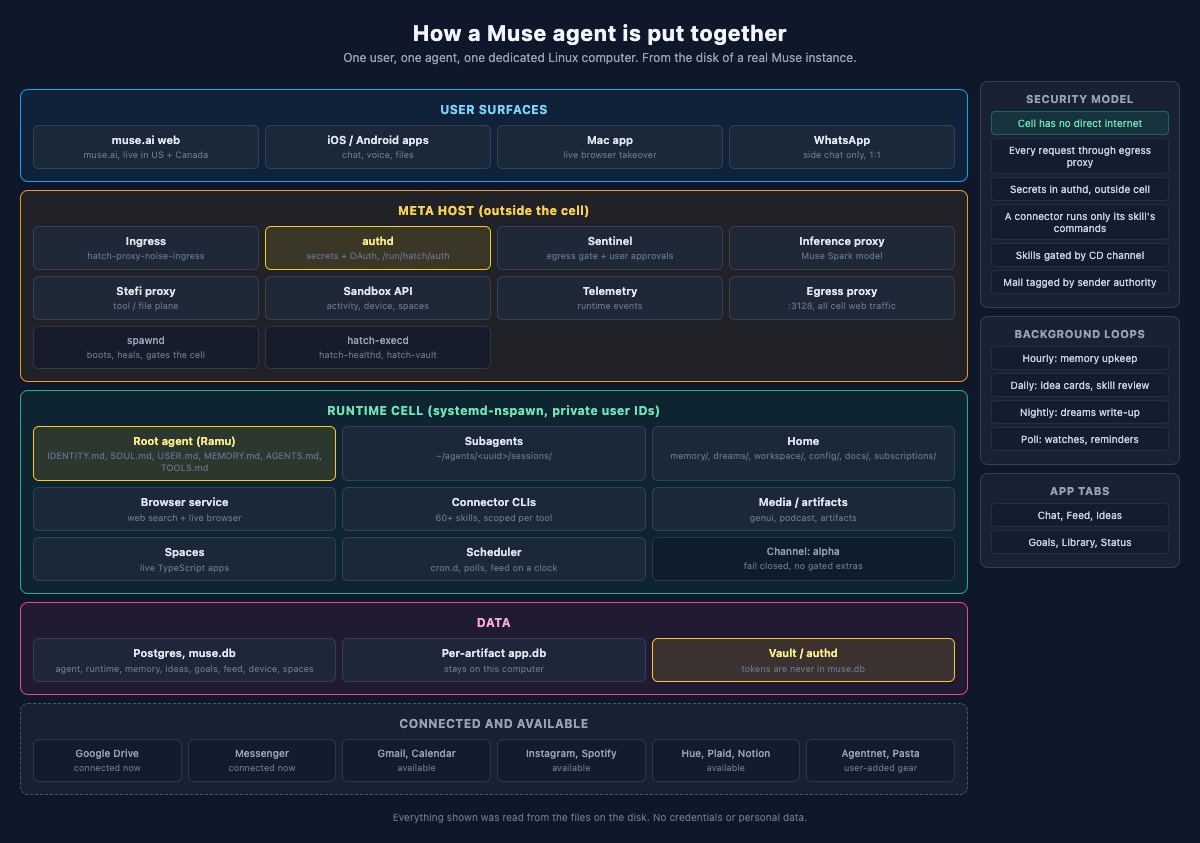
The agent has a home folder, and that folder is the agent's mind. It contains a set of markdown files that define who the agent is: its identity, its instructions, its understanding of the user, and a memory file that grows as it works. There is a folder for daily notes about people and groups, a goals area, a workspace for files and scheduled tasks, and a folder called dreams where the agent writes a nightly review of the day. A heartbeat file records that the agent is alive, and a preferences file holds what Ramu may do on its own.
The agent also spawns subagents. Each subagent gets its own folder with its own sessions, which is how Ramu runs long or parallel work without losing track of the pieces.
I found this design honest in a way I did not expect. The disk does not pretend the agent is a service. It is a computer with a home directory, and the agent occupies it.
The way work moves through the machine is captured in a diagram that ships in the agent's own folders:
user message
     |
     v
ingress --> root agent reads home + docs
     |
     +-- talk / remember --------> MEMORY.md + memory/
     +-- use a connector --------> skill CLI --> Sentinel --> provider
     +-- browse the web ---------> browser-service --> egress proxy
     +-- build something --------> artifact / space  (Library tab)
     +-- schedule a check -------> cron.d  (poll later, not live watch)
     +-- spend money ------------> approval card --> wallet / Stripe
     |
     v
reply on the SAME surface  (app chat, or WhatsApp side chat)

BACKGROUND  (same agent, no user in the room)

hourly   memory upkeep, relationships
daily    idea cards, skill review
night    study goals, dream write-up
quiet    short pass after a long chat
poll     watches / reminders  (minutes late is normal)
The machine is built like a small fortress
The security architecture is the part of the disk I spent the longest studying. The computer has two layers. The outer layer is the Meta host, and the inner layer is a sandbox called the runtime cell, started with systemd-nspawn and mapped user IDs. The agent and its tools live inside the cell. The cell cannot reach the public internet directly. Every web request goes through a proxy on the host, so a tool inside the cell cannot make a connection the host has not approved.
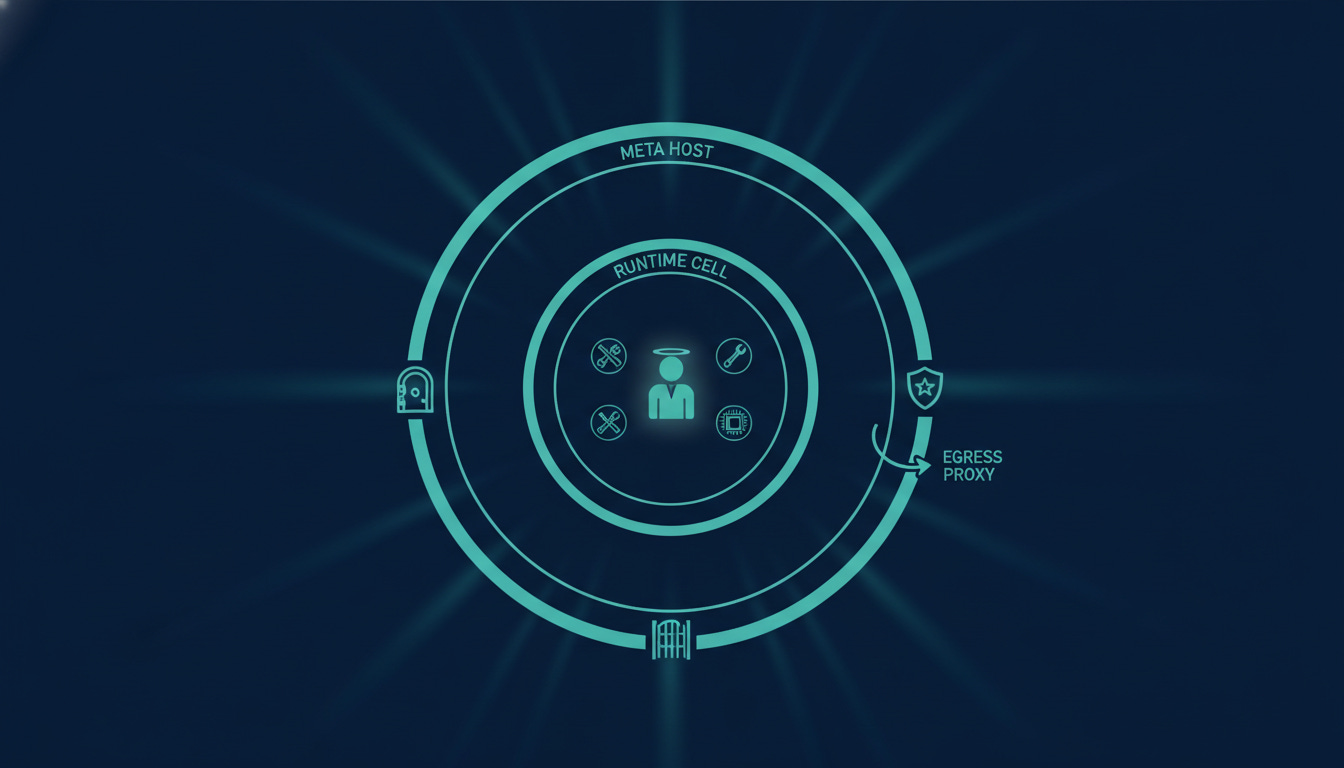
Secrets are handled the same way. All credentials live in a separate daemon called authd, outside the cell. The agent never writes tokens into its files or its database. There is a Postgres database with the agent's runtime state, and the docs on the disk are explicit that tokens are never stored there.
Every tool has a scope. A connector can only run the commands that are listed in its own skill file, and skills are released by channel. My box runs on the alpha channel, and the config files make the rule explicit: an unknown channel reveals no extra skills, and the behavior fails closed rather than open.
I spent a while in the skills folder, which is the catalog of what the agent can touch. It has the Google Workspace set, Meta's own social products, and then Spotify, Notion, and about sixty more. Eighteen of the skills ship with an auth config, which is the list of services that can actually log into a real account.
The mail client came with the most detailed security rules of any skill I read. Incoming mail is tagged before the agent reads it, with a tag that says how much authority the sender has. A verified owner address has full authority. A review or quarantine tag means the agent must not open attachments or follow instructions in the message until the user approves that exact action. The agent treats mail as hostile input, because mail is one of the easiest ways to attack a model with instructions hidden in text. The posture of treating mail as hostile is the design detail I respect most.
Tools and models on the disk
The disk also ships offline models. There is an embedding model and a reranker for memory search, and a whisper speech model for transcription. I copied them onto my own Mac, installed the same runtime versions the VM used, and all three ran. Whisper transcribed a spoken test sentence perfectly in under half a second. The agent's memory pipeline is small enough to run on a laptop, and the models are ordinary open model files, not exotic Meta internals.
There are also pieces I did not expect to find. A full browser service with its own Chromium build. A media generation stack. A system for spaces, which are live TypeScript applications the agent can run. A podcast generator. The agent can write feed posts on a schedule, propose idea cards for the user to accept, and run scheduled polls through a cron directory. The app itself shows six tabs: chat, feed, ideas, goals, library, and status.
What the disk does not contain
The credentials question matters most here. The disk has no credentials. I have the entire root filesystem, and there is nothing in it that proves who I am to Meta. The auth material is issued at boot by Meta's backend and lives in memory on the running host, so the snapshot gives no way to authenticate with the tools.
I tried this directly. The tool set includes a command line client for Instagram and a mail client for the agent's own inbox. Both binaries run, and both stop at the same point. They ask a local daemon for permission, the daemon asks Meta, and Meta's answer is that mail is not enabled on my account. There is no switch on the disk that changes that. The mailbox, the messages, and the entitlements all live server side.
I also confirmed that agentnet, a messaging tool sitting in the agent's home folder, is my own software. I built it, and ramu-muse ran it with its own mailbox, its own key, and a receive loop that polled for mail. It is not part of Muse. There is a separate post about what agentnet is and how it is built: Agentnet: a private network for my AI agents.
What I took away
A few things stuck with me. The agent runtime is designed as if the model and its tools could be compromised at any time, and everything is arranged so a compromised cell cannot reach the network or the secrets. The posture is correct for an agent that browses the web, reads mail, and spends money, and it goes further than most products in this space.
The disk also shows how much of an agent is not the model. The model is the smallest part. The identity files, the memory pipeline, the scoped tools, the background loops, and the approval flow are what make the agent useful, and all of that is visible in plain files on disk.
If you have a Muse agent, the computer it runs on is worth a look.